


Voice Recorder & Audio Notes
4.61.00 Reviews
App Specs
- Version
- 6.0
- Updated On
- License
- Free
- Downloads
- 10,000+
- Developer
- Simplesoft Studio
- Categories
- Music & Audio
- Platform
- Android
Screenshots
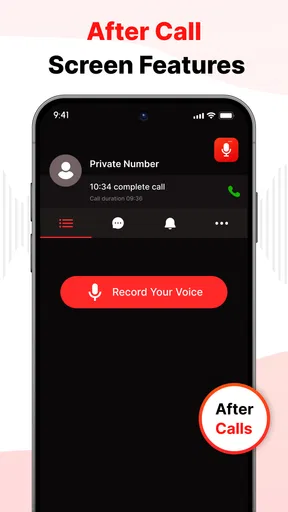
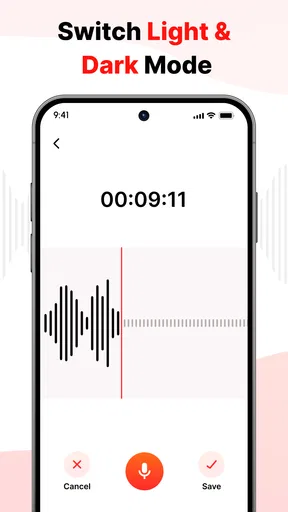
 Analysis by AppCompare
When I need to capture a spoken idea quickly, I usually want something that stays out of the way. Voice Recorder & Audio Notes is built around that simple need: record a voice, make a rough clip easier to use, and keep recordings organized rather than letting them disappear into a crowded audio folder. After spending time with it, I see it as a practical music and audio app for everyday notes, short reminders, interviews, rehearsal ideas, and personal reference material.
The app comes from Simplesoft Studio and is free to use. Its straightforward purpose is also its main appeal. I did not approach it expecting a full studio, automatic transcription service, or a replacement for a dedicated editing suite. Instead, I treated it as a lightweight recording desk on a phone. That distinction matters, because the best experience comes from using it for quick, manageable audio tasks rather than demanding advanced production tools.
What to expect from the recording workflow
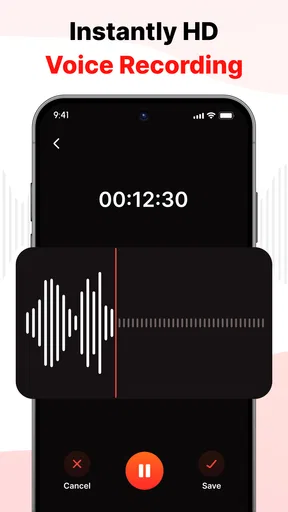
The first thing I noticed is how clearly the app is aimed at people who want to begin recording without a long learning curve. The central job is obvious: create a voice recording, trim away unwanted sections, add tags, and manage the saved material. That combination is more useful than a bare recorder because the difficult part often begins after pressing stop. A recording may be easy to make, but finding the right clip later is where a simple organizational system earns its place.
For a first-time user, I would think of the app as a small notebook with sound instead of handwriting. You can use it for a sudden idea while walking, a spoken shopping reminder, a language-practice sample, or a short explanation you want to replay later. It also makes sense for students recording their own revision prompts, musicians preserving a melody before it vanishes, and anyone who prefers speaking to typing.
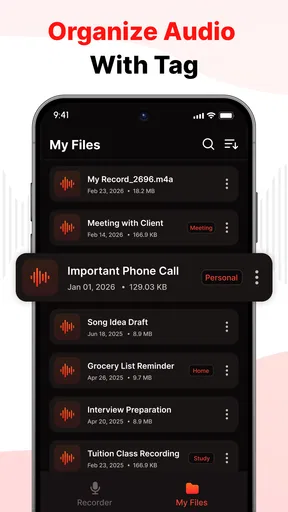
The store summary emphasizes recording, trimming, tags, and management, and those pieces work best together. I would not record everything under vague names and hope to sort it out later. A better habit is to decide on a small tagging scheme from the beginning. For example, I might use tags such as “ideas,” “work,” “study,” or “music,” then apply them consistently. The value is not in creating a complicated filing system; it is in making future retrieval predictable.
The app is free, carries an Everyone content rating, and has reached over ten thousand installs. Its average rating is four point six from thirty-five ratings, which suggests a generally positive early reception while also reminding me that it is a relatively small app community. It runs on Android seven or newer, so people using an older device may need to check compatibility before planning around it.
Voice Recorder & Audio Notes is currently at version six point zero and was released on April sixth, two thousand twenty-six. I mention the version because it helps set expectations: this is an actively presented app with a defined current release, but I would still keep important recordings backed up elsewhere if they matter professionally or personally. A phone recorder should be convenient, not the only place a valuable memory or interview exists.
Worth Reading Before You Choose

Flipboard Shows What News Apps Must Do Beyond the Feed

Switching to Android Auto Means Rethinking Your Driving Routine

Google Calendar Makes a Crowded Week Easier to Manage

Ludo King Makes the Most of the Minutes Between Plans

Baby Panda World Brings Quick Play to Modern Phones, but Its Game Library Feels Busy

ESPN’s Live Game View Makes Following Close Games Easier
Who will get the most from it
I think the strongest audience is people who want a focused tool rather than a large audio workspace. If your main goal is to speak, stop, clean up the beginning or end, and find the result later, the app fits naturally. It is especially approachable for users who do not want to learn tracks, effects, mixing controls, or a project-based editing system before making a useful recording.
It also suits a very specific kind of productivity: capturing information before it is fully organized. I often find that a voice note preserves more context than a few typed words. A spoken reminder can include the reason behind a task, the order of steps, or the exact wording of an idea. Once recorded, trimming lets me remove the hesitation at the start or the silence at the end, making the clip easier to replay.
On the other hand, I would skip this app if I needed serious multitrack music production, detailed sound restoration, automatic speech-to-text, or a large collaboration workflow. A dedicated audio editor is a better choice when you need precise waveform work, effects, layered instruments, or export control for a finished production. A cloud note service may be preferable when shared access and synchronization across several people are more important than quick local audio handling.
From installation to a useful first recording
My recommended first setup is deliberately small. Install the app, open it, and decide what the first recording is supposed to accomplish before speaking. That could be a thirty-second reminder about a task, a short melody, or a spoken summary of something you are studying. Starting with a defined purpose makes it easier to judge whether the workflow feels comfortable.
Before recording something important, I would make a test clip. Say a few sentences at a normal distance from the phone, stop, and play it back. This gives you a quick sense of how clearly your voice comes through in your usual environment. It also prevents a common mistake: recording a long interview or idea before discovering that the phone was too far away, surrounded by distracting noise, or positioned awkwardly.
Once the test sounds acceptable, make the first meaningful recording in one take. For a practical example, imagine that I am preparing for a busy morning and need to remember three errands. Rather than creating three separate fragments, I could record one short note, speak the errands in order, and leave a pause between them. Later, trimming the excess at the beginning and end produces a cleaner clip without turning the task into an editing project.
That pause-based approach is one of my favorite simple techniques. It gives the recording natural breathing room while making it easier to locate sections during playback. It also reduces the temptation to restart every time I stumble. A voice note does not need to sound like a broadcast; it needs to remain understandable when I return to it.
After saving the clip, I would add a tag that describes how I will look for it later, not merely what it contains. “Call” might be more useful than a vague label if the recording is a reminder to contact someone. “Song idea” is more helpful than “audio” when I am trying to find a melody among several personal notes. This is a small organizational decision, but it turns the app from a temporary recorder into a more dependable archive.
How trimming improves everyday notes
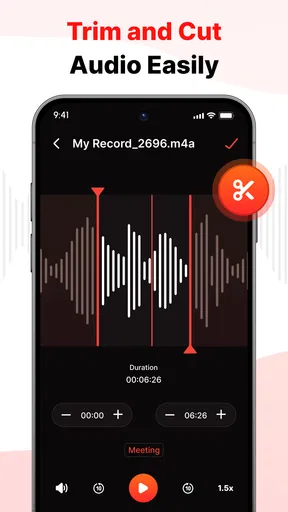
Trimming is most valuable when used for cleanup rather than ambitious editing. I would remove the accidental silence before I begin speaking, the moment after I finish, and any obvious false start that makes replay less comfortable. Keeping the process narrow helps preserve the original thought while making it faster to review.
There is also a useful trade-off here. A heavily shortened recording may sound neat but lose the context that made the note meaningful. I prefer to keep a natural pause when it separates two ideas, and only remove material that does not help me understand the clip. For an interview or an important personal memory, I would be conservative and keep the original until I was certain the trimmed version contained everything needed.
For music sketches, I would use trimming to frame the idea rather than polish it. Capture the melody, remove the fumbling before it starts, and leave enough of the ending to remember the rhythm. This is a different goal from mastering a track. The app is useful at the moment of inspiration because it lowers the effort between hearing an idea in my head and preserving it in a form I can revisit.
Keeping recordings findable instead of merely saved
Tags become more important as the collection grows. I would avoid inventing a new label for every recording, because that creates a filing system that looks organized but is difficult to search mentally. A short list of repeatable categories is easier to remember. If a recording belongs to two kinds of work, applying both relevant tags can be more useful than forcing it into one narrow folder-like idea.
I would also give each recording a moment of attention immediately after saving it. If the app allows the title or identifying information to be managed as part of its recording workflow, use wording that will still make sense later. Even without elaborate naming, a consistent pattern such as topic plus context is more practical than leaving every clip with a generic description.
A realistic routine would be to record during the day, trim only the clips worth keeping, and review the tags once in the evening. That prevents organization from interrupting the moment of capture. It also creates a natural point for deleting mistakes or deciding which notes have become unnecessary. The app is most effective when recording and management are treated as two connected steps, not as separate chores.
Confusing moments and sensible workarounds
The most likely confusion for a new user is expecting the app to understand the content of a recording automatically. Tags help organize clips, but they are not the same thing as transcription or semantic search. I would therefore speak a short identifying phrase at the beginning when the subject matters. Saying “meeting idea about the launch plan” before the actual note gives me an audible clue during playback and reduces dependence on memory.
Another point to understand is the difference between trimming and full editing. Trimming is ideal for shortening the edges of a clip, but it should not be mistaken for a complete production workflow. If I needed to remove several interruptions throughout a long interview, balance multiple voices, or add music underneath narration, I would move to a more specialized editor. The app’s strength is speed and simplicity, not a deep toolbox.
Users may also wonder whether it is suitable for important recordings. I would use it for personal notes, informal interviews, class revision, and creative sketches, but I would take extra care with anything irreplaceable. After recording a meaningful conversation or a valuable musical idea, I would keep a second copy using my normal device backup routine. Convenience is not a substitute for redundancy.
For privacy-sensitive situations, I would follow the same common-sense approach I use with any recording tool: tell people when recording is appropriate, respect local rules, and avoid treating a phone app as a guarantee of confidentiality. The Everyone rating describes the general age suitability of the app, not the sensitivity of every conversation recorded with it.
There is also a practical distinction between a quick note and a formal recording session. In a quiet room, the app can be a comfortable way to preserve a lecture thought, rehearsal passage, or personal journal entry. In a noisy public place, the result may require more patience during playback. I would test the environment first, move closer to the speaker when possible, and avoid assuming that trimming can fix unclear audio caused at the moment of capture.
How it compares with the usual alternatives
The basic voice recorder already included on many phones may be enough for someone who records once and immediately shares or deletes the file. Voice Recorder & Audio Notes becomes more appealing when trimming and tags are part of the normal routine. Those tools reduce the friction of turning a raw clip into something I can recognize and revisit.
A general note-taking app may be better for typed checklists, documents, and synchronized written material. I would choose this app instead when speaking is faster than typing or when tone and phrasing matter. A musician’s dedicated recording workstation offers far more control for production, but it also asks for more setup. For preserving a melody before it disappears, the lighter workflow can be the better tool precisely because it does not make me configure a project first.
Cloud-based audio services may win when a team needs shared libraries, comments, or access from several devices. I would not choose them automatically for a private, quick reminder. The right choice depends on whether I value immediate capture and simple organization or broader collaboration features. Voice Recorder & Audio Notes occupies the focused middle ground between a one-button recorder and a full audio studio.
My next-step recommendation
After the first successful recording, I would create a small repeatable workflow: capture the idea, replay it once, trim only the obvious dead space, add a meaningful tag, and decide whether it deserves to stay. This sequence takes the app beyond a novelty test. It turns the recording into a usable piece of information that can support a real habit.
For study, I would record a question on one clip and an answer on another, then tag both with the same subject. For creative work, I would use a tag for unfinished ideas and review those clips during a weekly planning session. For household tasks, I would record a short list and remove it after completing the errands. These examples use the same controls but give them different purposes, which is where the app’s flexibility becomes practical.
I would also keep the tagging system intentionally limited during the first week. If I create too many categories immediately, organizing becomes more work than recording. A few labels that match my actual routines are enough to reveal whether the management tools fit the way I think. If I consistently cannot find clips, that is a sign to improve my naming and tagging habits rather than simply making more recordings.
My overall impression is positive because the app understands a useful boundary. It gives voice capture a little more structure than the simplest recorder while avoiding the weight of a professional editor. The combination of recording, trimming, tags, and management makes sense for people who want their spoken notes to remain usable after the moment has passed.
My recommendation is simple: choose it if you want a free, approachable place for voice notes and lightweight audio organization. I would recommend looking elsewhere for transcription, advanced editing, team collaboration, or polished music production. For first-time users, though, the path is reassuring: make a short test, record one purposeful note, clean its edges, tag it clearly, and build from there. That is where Voice Recorder & Audio Notes feels most convincing.
Pros
- Clear recordings with adjustable audio quality options.
- Quickly save voice notes without creating an account.
- Simple interface makes recording easy for beginners.
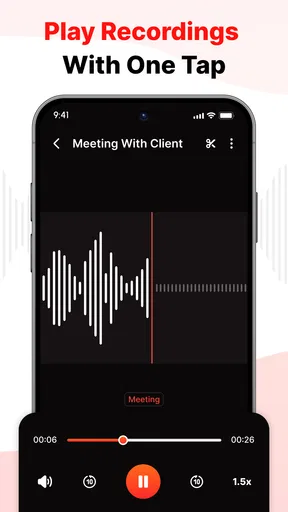
- Useful playback controls for reviewing saved notes.
- Supports organizing recordings for easier access.
Cons
- Some advanced features may require a paid upgrade.
- Background recording can affect battery life during long sessions.
- Built-in editing tools may be limited for detailed projects.
- Recording quality depends heavily on the phone’s microphone.
- Ads may interrupt the experience in the free version.
FAQs for Voice Recorder & Audio Notes
What is Voice Recorder & Audio Notes used for?
Voice Recorder & Audio Notes is designed for capturing spoken audio and organizing recordings for later use. It can be helpful for recording meetings, lectures, interviews, personal reminders, ideas, or study notes. After recording, you can usually review the file, rename it, and manage it from within the app, making it more convenient than relying on a basic phone recorder.
Does Voice Recorder & Audio Notes work without an internet connection?
In most situations, the core recording function works offline because audio is saved directly on the device. This is useful when recording in classrooms, offices, or locations with weak connectivity. However, features such as cloud backup, sharing through online services, synchronization, advertisements, or optional transcription tools may require internet access, depending on the version and device settings.
What audio quality and file formats does the app support?
The available recording quality and file formats can vary according to the app version, operating system, and selected settings. Users may be able to choose between lower-quality recordings that save storage space and higher-quality recordings that capture clearer voices but create larger files. Before recording important material, check the settings and make a short test to confirm the result meets your needs.
Can I share, export, or edit recordings made with the app?
Voice Recorder & Audio Notes generally provides practical options for managing recorded files, including renaming, deleting, playing back, and sharing recordings through compatible apps. Depending on the installed version, basic editing tools such as trimming may also be available. Export options can differ between Android and iOS, so verify that the desired format and sharing method are supported before relying on it for professional work.
Is Voice Recorder & Audio Notes safe and suitable for recording private conversations?
The app can be useful for personal notes, but users should review its microphone, storage, notification, and network permissions before granting access. Privacy also depends on where recordings are stored and whether they are backed up or shared. Always follow local laws and obtain consent when recording other people, especially during meetings, interviews, classes, or private conversations.


